Technical Experience — WordPress Local Development with DDEV & LocalWP
Experience Area: Local WordPress Development, Isolated Environments, Custom Theme/PHP Work & Safe Pre-Production Testing
Tools: DDEV, LocalWP, Docker, PHP, MySQL/MariaDB-style WordPress Databases, WordPress, Gutenberg, Elementor, Custom Themes, Custom PHP
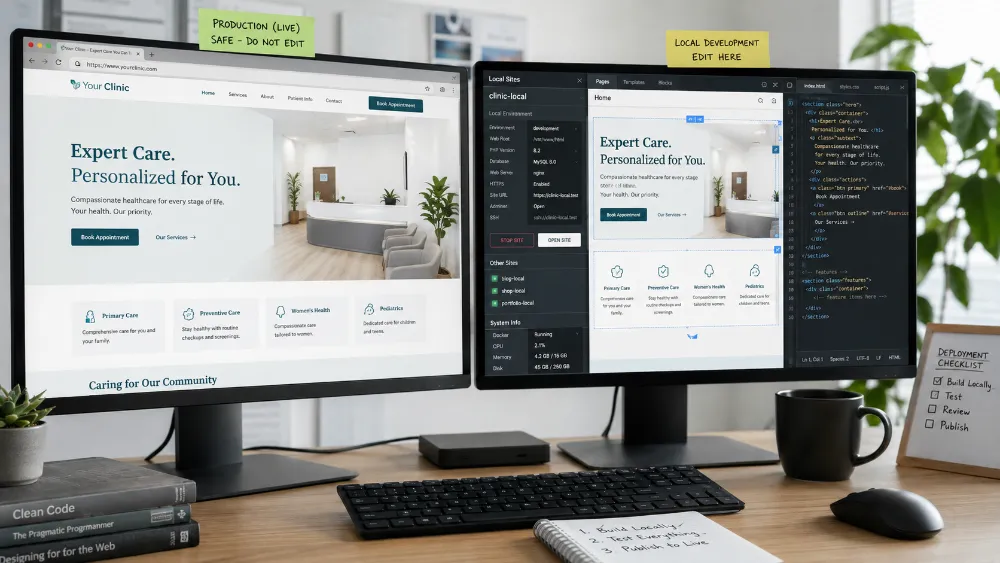
I Do Not Like Developing Important WordPress Changes Directly on Production
For small content edits, working on the live site can be fine.
For real development, it creates unnecessary risk.
A theme change, custom PHP function, plugin conflict, database change or AI-generated code can break the public website before I have properly tested it.
So local WordPress environments became a normal part of my workflow.
I use both DDEV and LocalWP, depending on the project and what kind of control I need.
DDEV Gives Me a More Developer-Controlled WordPress Environment
DDEV is useful when I want WordPress running inside a repeatable Docker-backed development environment.
I like it because the project is less dependent on one global PHP/database setup installed directly on Windows.
The environment can keep the application stack isolated from other projects.
That becomes useful when I am working on:
- custom WordPress development
- theme work
- PHP changes
- database-backed features
- API integrations
- testing before deployment
- projects that need a predictable local stack
DDEV also connects naturally with my wider Docker experience.
I understand that the convenient DDEV commands are managing a containerized environment underneath.
LocalWP Solves a Different Part of the Same Problem
I also use LocalWP heavily for local WordPress work.
LocalWP is useful when I want to create, inspect and operate an isolated WordPress site quickly without manually assembling the entire local server stack.
I have used it for real client/proof-site development where the local environment includes the full WordPress application, PHP runtime, web server and database.
It is especially useful when I want to:
- spin up a WordPress site quickly
- work on custom themes
- test frontend changes locally
- open the WordPress admin/editor
- validate routes and templates
- debug PHP/theme behavior
- test responsive output before production
I Do Not Treat DDEV and LocalWP as Competitors
I use them for slightly different working styles.
DDEV gives me a more explicit developer/container workflow.
LocalWP gives me a fast WordPress-focused local environment with less setup overhead.
The important skill is not loyalty to one tool.
It is being able to choose the environment that makes the current WordPress job safer and faster.
Local Development Became More Important as My WordPress Work Became More Custom
My WordPress work is not limited to installing a theme and changing colors.
I work with combinations of:
- custom PHP
- custom themes
- Gutenberg/native block development
- Elementor
- WooCommerce modifications
- custom CTA behavior
- REST/API integrations
- SEO architecture
- responsive layout work
The more custom the implementation becomes, the more useful a local environment becomes.
I can make structural changes without using the live client’s website as the test bench.
LocalWP Became Important in My AI-to-WordPress Development Work
One of my newer WordPress workflows combines AI-generated design/reference work with native WordPress implementation.
In those projects, LocalWP acts as the controlled development environment where the actual WordPress build is created and tested.
For example, I have used LocalWP while implementing native WordPress themes with:
- ordinary editable WordPress Pages
- Gutenberg blocks
- block locking
- custom PHP templates
- theme-level CSS
- minimal JavaScript
- responsive desktop/mobile layouts
The AI tools can help with implementation, but the WordPress site still needs to run inside a real local WordPress environment.
That Changed How I Use AI Coding Agents on WordPress
I do not want a coding agent experimenting directly against a production client site.
A local environment gives the agent a safer target.
The workflow can be:
requirements → local WordPress environment → bounded implementation → targeted checks → human review → production migration.
This is especially important because an AI agent can change PHP, templates or CSS very quickly.
Speed is useful only when the environment makes mistakes recoverable.
I Also Use Local Environments to Test WordPress Architecture, Not Just Styling
A local WordPress environment is useful for more than visual work.
I can test decisions such as:
- ordinary Pages vs custom content structures
- theme template behavior
- how reusable components should be implemented
- which content stays editable
- which layout areas should be protected
- how URLs/routes behave
- how global styles affect multiple pages
This helps catch structural mistakes before the project is already live.
Local WordPress Also Makes Debugging More Controlled
When something breaks locally, I can isolate the problem without immediately affecting visitors.
I can determine whether the failure comes from:
- theme PHP
- a template
- CSS
- a plugin
- database content
- a route
- the local PHP/server environment
- an AI-generated change
That is much easier than debugging while a client is watching a broken production page.
I Have Used Local Environments for Both Native WordPress and Builder-Based Work
My WordPress experience includes both:
builder-based projects such as Elementor
and
native/custom implementations using Gutenberg, custom themes and PHP.
Local development is useful in both cases.
With Elementor, I can test layout, responsive behavior and custom code safely.
With native WordPress, I can work directly on templates, blocks, theme structure and editability rules.
Moving From Local to Production Is a Separate Step
A local site being correct does not automatically mean production is correct.
Production can differ in:
- domain
- HTTPS
- server configuration
- PHP version
- database state
- caching
- file permissions
- DNS
- CDN/proxy behavior
So I treat migration/deployment as its own controlled step.
The local environment reduces development risk, but I still verify the production environment after launch.
DDEV Helps Me Think in Repeatable Environments
One reason I value DDEV is that it reinforces the idea that development infrastructure should be reproducible.
I do not want a project to work only because my computer happens to have the right PHP extension or database version installed globally.
That mindset is closely related to why I use Docker elsewhere.
Define the environment around the project instead of letting every project share one fragile machine-wide setup.
LocalWP Helps Me Move Faster When WordPress Itself Is the Main Focus
There are also projects where I do not need to think about the container layer directly.
I just need a reliable local WordPress environment so I can focus on the theme, content, UI and PHP.
That is where LocalWP is especially convenient.
Using both tools gives me flexibility instead of forcing every WordPress job into the same development setup.
I Do Not Present Local Development as the Final QA Environment
A local site is not the public internet.
It cannot perfectly reproduce every hosting, DNS, caching, CDN or third-party integration condition.
So I use local environments for development and controlled validation, then perform targeted production checks after migration.
This keeps testing proportional to risk instead of pretending local success guarantees production success.
The Biggest Lesson
The biggest advantage of DDEV and LocalWP is not convenience.
It is separation.
I can separate:
development from production
one project’s environment from another
experimentation from client-facing stability
AI-generated implementation from approved production code.
A good local WordPress environment gives me somewhere safe to make large changes before those changes become somebody else’s problem.
Skills & Technologies Demonstrated
WordPress · DDEV · LocalWP · Docker-Based Development · PHP · WordPress Databases · Local Development · Custom Themes · Custom PHP · Gutenberg · Native WordPress · Elementor · WooCommerce · Theme Templates · Block Locking · Responsive Development · REST/API Integration · Local QA · Debugging · AI-Assisted WordPress Development · Environment Isolation · Pre-Production Testing · Production Migration