Technical Experience — Web Security Labs, Authentication Testing & Security Tooling
Experience Area: Authorized Web Security Labs, Authentication Testing & Defensive Security Learning
Tools Used: DVWA, Burp Suite, Hydra, cURL, Browser Developer Tools, HTTP Requests, Cookies, Sessions, Wordlists
Scope: Controlled lab environments and security-learning exercises — not unauthorized penetration testing
My Security Experience Came From Wanting to Understand What Can Actually Go Wrong
As I worked more with websites, APIs, hosting and authentication, I did not want security to remain an abstract checklist.
I wanted to understand how common web weaknesses behave in practice.
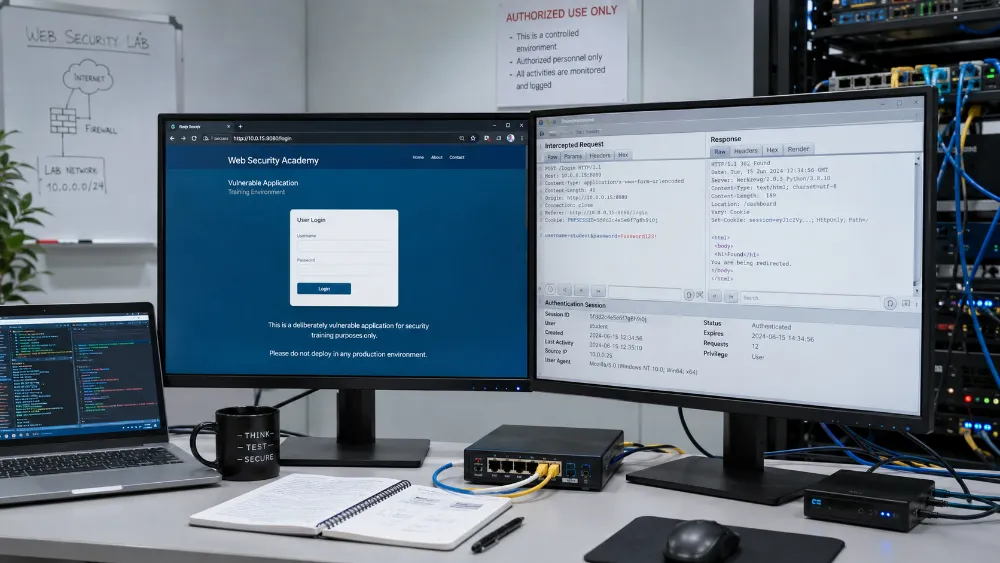
So I spent time in controlled security-lab environments where I could inspect requests, test authentication behavior and deliberately interact with vulnerable applications without risking a real third-party system.
This gave me a more practical understanding of why security controls matter.
DVWA Gave Me a Safe Place to Learn Against Real Vulnerabilities
I have used DVWA — Damn Vulnerable Web Application as a lab target.
The value of DVWA is that the application is intentionally vulnerable.
That means I can study how insecure behavior looks from the browser and HTTP level without testing against systems I do not own.
My focus was not on collecting exploit tricks.
It was on understanding the mechanics behind web security failures.
Burp Suite Helped Me See What the Browser Was Actually Sending
One of the biggest shifts in my understanding came from using Burp Suite.
A login form looks simple in the browser.
Underneath it, there is an HTTP request containing:
- method
- URL
- headers
- cookies
- form fields
- session state
- server response
Burp made that request/response flow visible.
That was useful because many authentication problems cannot be understood only by looking at the frontend.
Authentication Testing Taught Me That a Login Is a Protocol, Not a Button
I worked with form-authentication testing in controlled environments.
To reproduce a login attempt correctly, I needed to understand:
- which HTTP method the form used
- which field represented the username
- which field represented the password
- whether the request needed cookies
- how the application represented success vs failure
- whether session state changed after authentication
This made login systems much less mysterious.
The UI may show a username field, password field and button.
The security boundary is the complete request and session behavior behind them.
Hydra Gave Me Experience With Automated Authentication Testing in Labs
I have used Hydra in authorized lab exercises to understand automated login testing.
This required more than pointing the tool at a URL.
The request needed to match the target application’s actual authentication flow.
That meant understanding:
- form parameters
- login endpoint
- failure indicators
- session cookies where relevant
- username/password input sources
- wordlists
When a test did not work, I had to debug whether:
the credentials were wrong
or
the request definition itself was wrong.
That distinction became one of the most useful lessons from the lab work.
cURL Helped Me Reproduce Requests Without the Browser
I have also used cURL to manually reproduce and debug HTTP requests.
This was useful because it strips away the browser UI and forces me to think about the actual protocol.
With cURL, I could reason directly about:
- request methods
- headers
- cookies
- form data
- redirect behavior
- server responses
This experience later became useful outside security labs as well, especially when debugging APIs, webhooks and authentication problems.
Cookies and Sessions Became Much More Concrete
Before working through security labs, it is easy to think of a login as:
“The server checked my password, so now I am logged in.”
In practice, the application needs some way to remember that authenticated state.
Working with cookies and session identifiers helped me understand how that state moves between browser and server.
This became useful knowledge in later application work involving:
- authentication
- client portals
- role-based access
- API authorization
- secure application design
The Lab Work Also Improved My Debugging
A failed security test is often a debugging problem.
For example, an automated authentication attempt may fail because:
- the wrong endpoint is being used
- the form field name is wrong
- a cookie is missing
- the success/failure condition is incorrect
- the session changed
- a redirect is being misunderstood
That debugging process trained me to inspect the request before assuming the target behavior.
The same thinking now helps when I troubleshoot:
- REST APIs
- webhooks
- OAuth flows
- application sessions
- API authentication
Security Labs Changed How I Think About Password Protection
Seeing automated authentication testing in practice makes weak password security much easier to understand.
A login form does not become secure simply because the password field hides the characters.
Defensive controls can include areas such as:
- strong passwords
- rate limiting
- multi-factor authentication
- account lockout / abuse controls where appropriate
- secure session handling
- monitoring suspicious authentication behavior
My lab work made these controls feel like responses to real failure modes rather than generic security advice.
This Experience Later Connected to My Application Security Work
When I later worked on private web applications, client portals, Supabase permissions, webhook authentication and MFA-related features, the earlier security-lab experience helped me think more carefully about trust boundaries.
I already understood that:
authentication is not the same as authorization.
A user proving their identity does not automatically mean they should be able to access every resource.
That principle later became important in client-specific portal data and role-based application access.
It Also Changed How I Treat Secrets
Security work reinforced that credentials and secrets should not be casually embedded into visible application code or automation logic.
In later systems, I prefer:
- proper credential stores
- server-side secrets
- environment variables
- bounded permissions
- separating public client code from privileged server access
This is not because hiding a secret solves every security problem.
It is because exposing unnecessary credentials creates avoidable risk.
I Do Not Present This as Professional Penetration-Testing Experience
This distinction matters.
I have hands-on experience with web security tools and controlled vulnerability labs.
I understand request inspection, authentication testing, sessions, cookies and common security concepts more deeply because I have worked with them directly.
But I do not claim to be a professional penetration tester who has performed full authorized assessments against enterprise client environments.
My portfolio should show the experience accurately:
practical security-lab knowledge that improves how I build and troubleshoot web systems.
The Biggest Lesson
The most useful lesson from security labs was not learning a specific tool command.
It was learning to look beneath the interface.
A login page is an HTTP request.
An authenticated user is session state.
An API call is a permission boundary.
A hidden password field is not a security control by itself.
Understanding how a system can fail makes me more careful about how I build the system in the first place.
Skills & Technologies Demonstrated
Web Security Labs · DVWA · Burp Suite · Hydra · cURL · HTTP Requests · Form Authentication · Cookies · Sessions · Session IDs · Wordlists · Request/Response Inspection · Authentication Debugging · Security Testing Concepts · Password Security · Rate Limiting Concepts · MFA Concepts · Authorization Concepts · API Security · Webhook Security · Secure Credential Handling · Defensive Web Development