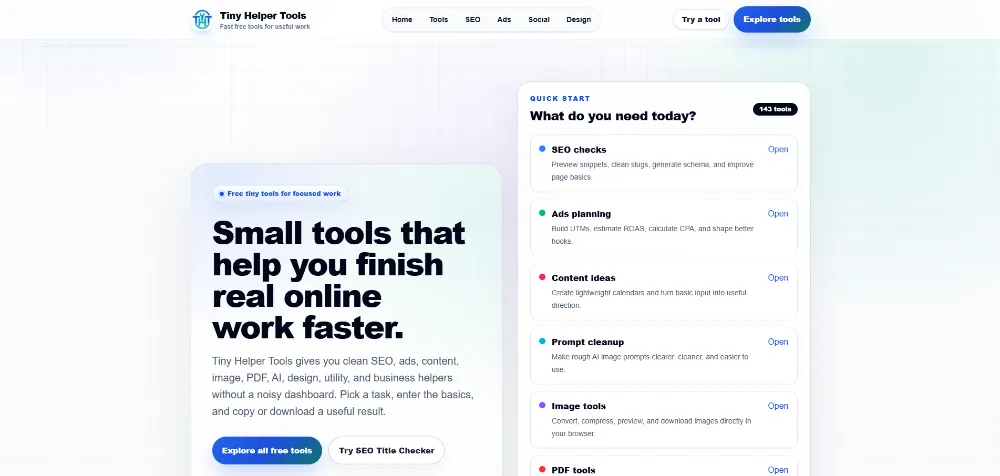
Software — Building TinyHelperTools.com From One Utility Into a 143-Tool Growth Platform
Project: TinyHelperTools.com
Type: Client Node.js Web Application
URL: https://tinyhelpertools.com/
Role: Product & Systems Architect, AI-Assisted Web App Builder, SEO/Tool Platform Developer
Core Stack: Node.js, Next.js, TypeScript, React, Tailwind CSS, Supabase, AI APIs, Structured Data, Dynamic Routing

The Client Did Not Need “Another Tools Website”
The client wanted to build a free online tools platform.
That sounds simple until you look at the market.
There are already thousands of websites filled with:
- Thin calculator pages
- Copied PDF utilities
- Weak programmatic SEO pages
- Tools that barely work
- Pages built for keywords rather than users
- Heavy signup walls around basic results
So the real product challenge was not:
“How do we launch lots of tools?”
It was:
“How do we build a platform where every tool is useful, the site can scale cleanly, and search growth does not depend on publishing hundreds of low-value pages?”
The positioning became:
Free tiny tools for SEO, ads, content, design, utility, and business growth.
We Started With One Tool on Purpose
The first working tool was a simple Text Counter.
That was deliberate.
Instead of trying to build 50 utilities in the first sprint, we first needed to prove:
Can the page structure work?
Can the tool engine produce useful results?
Can the UI stay consistent?
Can SEO metadata be generated safely?
Can another tool be added without rebuilding the whole page?
The development rule became:
Foundation first. Then one real tool at a time.
The Second Tool Exposed the Real Engineering Problem
Once the SEO Title Checker was added, it became obvious that building every tool as a completely separate page would eventually become expensive and messy.
If each new tool required:
- A new page layout
- New SEO logic
- New breadcrumbs
- New result UI
- New related-tool logic
- New CTA logic
- New metadata handling
then the 100th tool would become harder to maintain than the first.
So the project changed direction early.
Instead of building individual mini-sites, I built a reusable tool engine.
The Tool Registry Became the Core of the Platform
Each tool could be described through structured metadata:
- Name
- Slug
- Category
- Description
- SEO title
- SEO description
- Inputs
- Output type
- Difficulty
- FAQ content
- Related tools
- Tool behavior
The application could then render the tool through a shared dynamic route:
/tools/[category]/[slug]
This changed the economics of development.
Adding another calculator or text utility no longer meant creating another full page system.
The new tool could inherit the platform around it.
But I Did Not Force Every Tool Into One Generic Form
A common mistake in reusable software is pushing the abstraction too far.
A ROAS calculator fits a structured form.
A PDF page reorder tool does not.
An image cropper needs a completely different interaction.
An AI writing tool has different runtime requirements again.
So the architecture gained two lanes:
Generic tools use the common Tool Runner.
Specialized tools can plug custom interfaces into the same page shell.
That allowed specialized implementations for things such as:
- Image conversion
- Image compression
- Image resizing
- Image cropping
- Image metadata cleanup
- Favicon generation
- PDF merging
- PDF splitting
- PDF page extraction
- PDF page reorder/delete
- Images to PDF
- AI tools
The lesson was:
Reuse the system where the problem is reusable. Do not damage the UX just to preserve one abstraction.
Then the Tool Count Started Growing Fast
Once the engine was stable, the client could expand much more quickly.
The platform grew through tools for:
- SEO
- Paid advertising
- Business calculations
- Social media
- AI writing
- Design
- Image processing
- PDF operations
- Text cleanup
- JSON / CSV utilities
- General productivity
By the V2.25 growth sprint, the site had reached approximately 143 tools.
That created a new problem:
A large tool library can become difficult to navigate even when every individual tool works.
So Discovery Had to Become a Product Feature
At first, category pages were enough.
Then the collection became too large for users to browse manually.
The site began organizing tools around:
- Categories
- Popular tools
- Recently added tools
- Goal-based groups
- Search
- Related tools
- Category highlights
The question changed from:
“Does this tool exist?”
to:
“Can a user find the right tool for the job in front of them?”
Then SEO Became the Biggest Risk
Scaling from a few tools to more than 100 creates an obvious temptation:
Publish every possible keyword variation.
I deliberately avoided that strategy.
The project had an explicit rule:
No fake live tool pages. No weak programmatic SEO pages.
Every public tool had to provide actual working value.
Then the platform itself needed strong SEO infrastructure:
- Unique metadata
- Canonical URLs
- Sitemap generation
- Robots controls
- Selective noindex support
- Breadcrumb structured data
- Software/tool structured data
- Selective FAQ structured data
- Category pages
- Internal linking
- Related tools
The SEO system became part of the software rather than something manually added after every tool launch.
But Tools Alone Were Still Too Thin for Some Search Problems
A calculator answers one question.
A user often needs to understand the workflow around that calculation.
For example:
A ROAS calculator can calculate ROAS.
But it cannot by itself teach someone how to diagnose bad ad economics.
A sitemap generator can create a list.
But it cannot explain which pages should be excluded or why.
So the project gained a content layer.
Guides Became the Educational Layer Around the Tools
Instead of generating thousands of thin articles, I built a structured guide system around practical jobs.
Guides could explain topics such as:
- SEO title and description problems
- Robots.txt and sitemap basics
- Redirect planning
- Hreflang
- CTR and conversion diagnosis
- Google Ads RSA checks
- UTM naming
- Profit margins and discounts
- Invoice and tax calculations
- Content workflows
- JSON/CSV cleanup
- AI content review
- PDF preparation
By the V2.25 sprint, the site had roughly 68 blog URLs, including around 65 code-backed practical guides.
The content architecture became:
Tool solves the task → guide explains the workflow → category connects related problems → internal links connect the ecosystem.
Then AI Tools Created a Completely Different Reliability Problem
Rule-based tools are predictable.
AI tools are not.
Once the client wanted public AI helpers, a simple API call was not enough.
A public AI tool can fail because:
- A provider is down
- A model is unavailable
- A model name changes
- A request times out
- A free provider rate-limits the user
- The model returns low-quality output
- The result includes unwanted reasoning text
- Usage becomes too expensive
So AI became its own subsystem.
The AI Router Was Built for Failure
The AI layer gained:
- Multiple provider support
- Provider priority
- Model discovery
- Model preference lists
- Model health tracking
- Fallback routing
- Rate limits
- Input/output limits
- Response caching
- Prompt validation
- Output sanitation
- Output-quality checks
The current provider architecture supports Gemini, Groq, and OpenRouter.
If one provider/model fails with conditions such as timeout, rate limiting, server errors, or unusable output, the router can try another available option.
The system also remembers unhealthy models temporarily instead of repeatedly hitting the same failing endpoint.
This changed the AI feature from:
“Call an LLM.”
into:
“Provide a reliable public AI utility despite unreliable external providers.”
Then Cost Control Became Part of UX
If an AI tool is free, unlimited generation is not really free.
Someone is paying for the tokens.
So the platform introduced public usage limits while keeping a separate admin/testing path.
That meant the client could offer useful AI functionality without turning a free tool into an uncontrolled API bill.
The broader principle became:
Free for the user does not mean unmetered inside the infrastructure.
Then User Requests Became Product Research
Once users can request tools, another mistake becomes possible:
Build every request.
Instead, the request system was designed around a better question:
Is this a repeatable task with clear inputs and a useful output?
The request experience encouraged users to describe:
- The task
- An example input
- The desired output
Vague requests such as:
“Build something that finds every SEO problem automatically.”
are much harder to turn into a trustworthy tiny tool.
But a request such as:
“Take a list of URLs and produce a redirect checklist with duplicate-destination warnings.”
has clear product boundaries.
This gave the client a way to use real requests as roadmap signals instead of guessing forever.
Then the Client Needed to Operate the Platform Without Editing Code
As the site grew, content and product operations became their own problem.
It was no longer practical to change code every time the client wanted to:
- Publish or archive content
- Review feedback
- Review tool requests
- Change discovery settings
- Inspect AI usage
- Inspect site events
- See top tools
- Review audit history
So an admin layer was added.
The application gained backend operations around:
- Site events
- Tool views
- AI generation attempts
- AI successes/errors
- Feedback
- Tool requests
- Blog posts
- Content pages
- Publishing states
- Site settings
- Admin audit logs
The project had evolved from a tools website into a small publishing and product-operations platform.
Then Admin Errors Needed to Become Safer
Early admin APIs could simply catch a backend error and return an empty result.
That can make a broken system look like a healthy system with no data.
Later hardening introduced structured warnings and safer error responses.
The distinction became:
“There are zero feedback items.”
versus:
“The feedback query failed, so zero items cannot be trusted.”
This sounds small, but it is an important operations principle:
Do not turn system failure into misleading empty-state UX.
Then Monetization Had to Be Designed Without Damaging Trust
The client wanted the platform to have a path toward revenue.
But the free utility itself needed to remain genuinely useful.
So the monetization model was designed around:
Free useful result → relevant recommendation → optional expanded asset or product.
Potential future layers included:
- Email capture
- Lead magnets
- Affiliate offers where genuinely relevant
- Downloadable checklists
- Paid templates
- Paid reports
- Calculator sheets
- Saved reports
- Accounts
- Premium outputs
- Subscriptions after proven demand
One rule stayed important:
Do not block the basic useful result behind an email form.
Conversion should happen after value, not before it.
The Build Process Also Became More Disciplined
This project was developed with several AI-assisted coding tools.
But I did not want five agents independently redesigning the architecture.
The operating model was:
One planning authority → one bounded task → one executor → validate → stop.
Local agents such as Codex, Gemini CLI, Antigravity, Cursor and OpenCode could execute small tasks, but the project plan and architecture stayed controlled.
The repository also gained validation scripts for:
- Tool definitions
- Starter integrity
- MVP plan
- Agent instruction files
- Environment
- Tool engine consistency
That reduced the risk of rapid AI-assisted development quietly breaking the underlying platform.
What the Platform Became
TinyHelperTools.com grew from a single small utility into a much broader product:
143+ practical tools
across SEO, ads, business, social, AI, design, image, PDF, utility and content tasks.
A reusable tool engine
so the site could scale without rebuilding the same page system repeatedly.
Specialized tool interfaces
for cases where the generic engine was not the right UX.
A multi-provider AI subsystem
with fallback, model health, caching, rate limiting and output-quality controls.
SEO infrastructure
with canonical URLs, dynamic sitemap, structured data, internal linking and selective index controls.
A practical guide/content system
to add depth around the tools instead of relying on thin programmatic pages.
An admin operations layer
for analytics, publishing, feedback, tool requests, settings and audits.
A value-first conversion model
where useful output stays free and monetization can be added around deeper value later.
Then Performance Became a Measurable Product Achievement
As the platform expanded to more than 100 tools, dynamic routes, SEO infrastructure, admin features, AI utilities, images, PDFs and content systems, performance could easily have degraded.
That created another engineering requirement:
The platform had to scale in capability without becoming slow.
On August 16, 2026, I tested the live TinyHelperTools.com homepage with Google PageSpeed Insights / Lighthouse on desktop.

The production result was:
- Performance: 100 / 100
- Accessibility: 100 / 100
- Best Practices: 100 / 100
- SEO: 100 / 100
The same test recorded:
- First Contentful Paint: 0.3 s
- Largest Contentful Paint: 0.5 s
- Total Blocking Time: 40 ms
- Cumulative Layout Shift: 0
- Speed Index: 0.5 s
This was especially important because the result was achieved after the product had already grown into a large, multi-category tool platform rather than on an empty starter page.

The achievement was not simply:
“A website scored 100.”
It demonstrated that the architecture could support a large public product while still delivering an extremely fast desktop experience, strong accessibility, clean technical implementation and strong SEO fundamentals.
Measured production proof: 100 Performance + 100 Accessibility + 100 Best Practices + 100 SEO.
Note: this was a Lighthouse desktop lab test. The PageSpeed report did not yet show enough real-user field data, so I do not present it as a Core Web Vitals field-data claim.
The Biggest Lesson
The difficult part of this project was never writing one calculator.
The difficult part was making the platform easier to grow as it became larger.
If every new feature made the codebase more fragile, the product would eventually collapse under its own tool count.
So the real success criterion became:
Can the 143rd tool be easier to launch than the first?
That required:
Reusable architecture.
Clear escape hatches for specialized UX.
SEO controls.
AI reliability engineering.
Admin operations.
Validation.
And discipline about what not to publish.
That is how a client’s small free-tools idea became a scalable Node.js product platform instead of a pile of disconnected utility pages.
Skills Demonstrated
Node.js · Next.js · TypeScript · React · Tailwind CSS · Product Architecture · Dynamic Routing · Tool Engines · Config-Driven Development · AI API Integration · Multi-Provider AI Routing · Fallback Systems · Rate Limiting · Caching · Output Validation · SEO Architecture · Structured Data · Programmatic SEO Risk Control · Content Systems · Admin Dashboards · Analytics · Publishing Workflows · PDF Tools · Image Tools · Calculators · Supabase · API Design · QA Automation · AI-Assisted Development · Conversion Architecture