Software — How Scattered Growth Operations Became GFX Hawker Growth OS
Project: app.gfxhawker.com
URL: https://app.gfxhawker.com/
Role: Product & Systems Architect, AI-Assisted Web App Builder, Automation Integrator
Core Stack: Node.js, Next.js, TypeScript, Supabase, n8n, REST/Webhooks, Hostinger Cloud, Role-Based Access, MFA

The Problem Was Not “I Need a Dashboard”
I was building more and more useful systems.
SEO automations.
Meta and Google Ads systems.
Website lead capture.
Social publishing.
Uptime monitoring.
Reporting workflows.
n8n was becoming very good at making machines talk to each other.
But that created a different problem:
The machines knew what was happening. I did not have one good place for a human to run the business.
Leads could live in one system.
Automation logs in another.
Client work somewhere else.
Reports had to be assembled separately.
A client might need to see progress, but definitely should not see internal notes, failed workflow details or another client’s data.
So I started building GFX Hawker Growth OS.
Not as another generic CRM.
Not as a pretty analytics dashboard.
It was meant to become the human control layer over the growth and delivery systems I was already building.
n8n could become the nervous system. Growth OS would become the control room.
V0.1 — First, Prove the Shape of the Product
The earliest version was deliberately simple.
It used demo data and focused on the basic operating surfaces:
- Admin dashboard
- Client portal preview
- Client reports
- Pipeline
- Tasks
- Automation activity
- Settings
I did not want to begin by designing a huge database or building every possible feature.
The first question was:
“If all of my growth operations were visible in one application, would this actually help me run the business?”
Once the answer was yes, the demo immediately exposed the next problem.
A Client Portal Is Useless Without Real Privacy
A fake portal with demo data is easy.
A real portal creates a much more serious requirement:
Client A must never be able to see Client B.
That changed the project from a front-end prototype into a real application.
Supabase was introduced for database and authentication.
The system gained:
- Real user authentication
- Admin and client roles
- Client records
- Reports
- Tasks
- Activity events
- Row-level security
- Client-user assignments
Security was no longer something to add after the UI was finished.
It became part of the data model.
Then Reports Taught Me That “Visible” Is a Business Decision
Once reports contained real information, another distinction became important.
An internal report draft is not automatically a client report.
A team note is not automatically client-safe.
An automation error is not something a client necessarily needs to see.
So reporting evolved around explicit visibility.
A report could be created internally, reviewed, improved, and only then intentionally published.
The operating rule became:
Internal truth and client-facing communication are related—but they are not the same thing.
That eventually grew into full report detail pages, client-safe report views, proof links, metrics, next actions, delivery timelines and print/PDF-friendly reports.
The Pipeline Preview Became Useless the Moment I Needed to Use It
The first pipeline was a preview.
That was enough to design the interface.
But the moment real leads were involved, hardcoded stages made no sense.
Different businesses need different sales processes.
Leads need to move.
Follow-up needs to be remembered.
Stage changes need to persist.
So the pipeline became database-backed and editable.
Drag-and-drop movement, stage management and activity events turned a visual mockup into an operating tool.
This became a recurring pattern in the whole project:
Do not automate or generalize a feature until the real workflow proves what it needs to become.
Then n8n Needed to Enter the App
The next major step was obvious.
I did not want a human manually copying everything into Growth OS.
The automations already knew when:
- A lead arrived
- An article started or completed
- A social post was scheduled or published
- A website health event happened
- A metric snapshot was collected
- An automation succeeded or failed
So n8n became the normalizer between external tools and the app.
The architecture moved toward:
Meta Ads / Google Ads / Website / SEO / Social / Automation → n8n → Growth OS webhook → structured operational record.
A Webhook Is Not “Just a URL” Once It Can Write Business Data
As soon as external automation could write into the application, the webhook became a security boundary.
The system added secret-protected server-side ingestion.
Valid requests could be processed.
Wrong or missing secrets were expected to return unauthorized responses.
Server-only Supabase access stayed server-side.
That was the point where the project stopped being a collection of pages and became a connected software system.
Then Integrations Started Disagreeing With Each Other
This is where the project became much more interesting.
When only one workflow sends data, naming is easy.
When many independent automations send data, tiny differences become bugs.
One system might call a service:
“Uptime Monitor”
while another event says:
“Website Uptime Monitor.”
One source might say:
“Metrics”
while another says:
“Traffic Analytics.”
The application can then accidentally show duplicate services even though they represent the same work.
That real integration problem eventually led to canonical service naming and alias normalization.
The software learned to understand that differently named events could belong to one service.
This was a much more valuable fix than simply hiding the duplicate card in the UI.
Then Automation Retries Created Duplicate History
Reliable automations retry.
But retries create another systems problem:
What happens if the same event reaches the app twice?
During real integration work, duplicate uptime activity appeared.
The wrong fix would have been:
“Remove one row manually.”
The real problem was that webhook ingestion needed to become duplicate-safe.
That pushed the system toward deduplication and safer event processing.
The lesson:
A successful API response does not mean the event should be processed twice.
Client Delivery Created a New Layer
As the application moved closer to real client use, it was not enough to track leads and automations.
I also needed to answer:
What are we supposed to deliver?
What is being worked on?
What is complete?
What proof exists?
What should happen next?
That is how delivery tasks, service scope, delivery updates and client readiness became important.
The client record stopped being only contact/business information.
It became the center that connected:
services → tasks → automation activity → metrics → reports → portal.
Then Client Access and Team Access Became Two Different Problems
At first, “users” can sound like one feature.
In practice, internal staff and clients have completely different trust boundaries.
Internal users may need operational pages.
Clients should see only their assigned portal and intentionally published information.
So the application separated responsibilities:
- Clients = business/client records
- Client Onboarding = create/link client users
- Client Readiness = verify the portal is safe before access
- Access QA = privacy/debug testing
- Team = internal staff
This sounds like a navigation decision.
It was actually a security and operating-model decision.
Then Security Had to Grow With the Product
As more real users and production data entered the system, username/password authentication was not enough for internal access.
The app evolved to include:
- Role and permission controls
- Authenticator-app MFA
- MFA challenge/setup flows
- Forced MFA for internal roles
- Remembered/trusted devices
- Password change and reset flows
- User disable/enable controls
- Security event logging
- Admin security review tools
This was not built because the settings page needed more options.

It was built because the application was becoming important enough that an account compromise would matter.
Then Production Hosting Changed the Priorities
Locally, the application could feel fine.
Production on Hostinger exposed another reality.
At one point, measured timings included roughly:
- Login TTFB: about 3.20 seconds
- Dashboard LCP: about 2.97 seconds
- Clients LCP: about 5.20 seconds
- Reports LCP: about 4.28 seconds
The wrong response would have been to redesign the whole application.
Instead, I looked for the expensive operations.
The production-hardening work included:
- A lightweight
/api/healthendpoint for monitoring - Disabling expensive private-route preloading by default
- Reducing unnecessary database-backed branding calls
- Caching application branding
- Reducing database payload sizes
- A faster trusted-device path before expensive MFA checks
After that performance QA, recorded results included approximately:
- Login TTFB: 0.21 seconds
- Setup-check TTFB: 0.43 seconds
- Clients LCP: 2.27 seconds
- Reports LCP: 2.36 seconds
The dashboard remained something to watch rather than pretending every performance problem was solved forever.
This was one of the strongest product lessons:
Production performance is part of software architecture, not just front-end polish.
Then V2 Turned the App Into the Actual Delivery Operating System
Once the secure production foundation existed, the next generation focused much more on the day-to-day business.
Capabilities grew around:
- Client setup and scope
- Delivery operations
- Task updates
- Report builder
- Client sharing
- Client review
- n8n ingestion
- Automatic lead pipeline
- Metrics
- Automated report drafts
This is where the product moved from:
“a private internal app”
toward:
“the place where GFX Hawker can actually operate client growth work.”
Raw Automation Data Was Not Enough — It Needed Context
A workflow execution log is useful to a developer.
It is not necessarily useful to a business operator or client.
So Growth OS started translating machine events into business context.
Instead of only:
“workflow execution 4832 succeeded”
the useful question is:
“What service moved forward for which client?”
That is why later versions became more focused on service progress, activity timelines, proof, metrics and reporting.
Then Lead Data Needed to Become a Real Pipeline
Once Meta, Google and website systems could send lead information into Growth OS, the application needed somewhere to work those leads.
Lead Intake and the pipeline connected automated acquisition with human follow-up.
The desired flow became:
Ad / website → n8n → Growth OS Lead Intake → qualify → pipeline → follow-up → client relationship.
This is the point where the app became a bridge between automation and sales operations rather than only a reporting product.
Then Metrics Needed to Prove Business Value
Automation activity tells me that work happened.
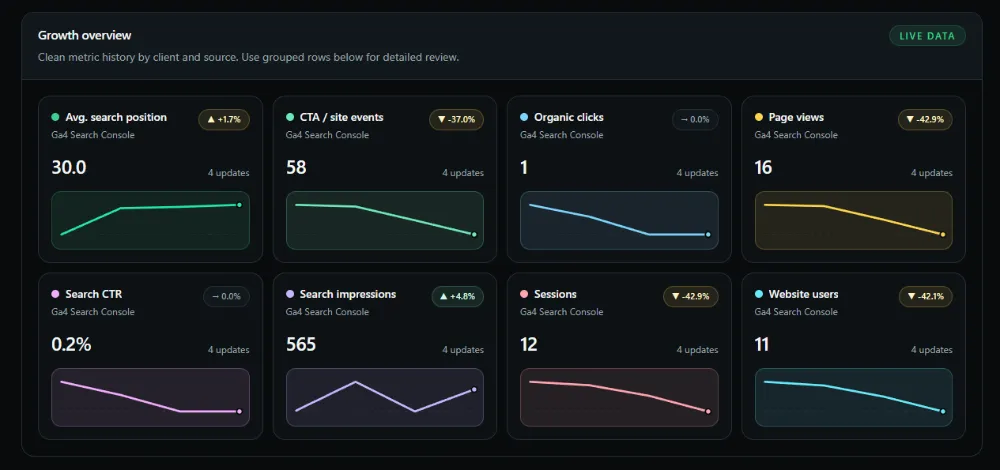
Clients care about what changed.
So metrics became their own layer.
The app could accept and organize signals from areas such as:
- SEO
- Website
- Meta Ads
- Google Ads
- Social
- Automation
- Leads
Those metrics could then support client reporting instead of living as isolated numbers in external dashboards.
Then Reports Could Start Drafting Themselves
Once Growth OS already knew:
- What tasks were completed
- What automation events happened
- What metrics changed
- What lead activity existed
- What proof links were available
another opportunity appeared:
Why manually rebuild the first draft of every weekly or monthly report?
That led to automated report drafts.
But I deliberately kept a review boundary.
The system can assemble a useful hidden draft.
A human can review, improve and publish it.
Automation prepares communication.
It does not silently decide what the client should be told.
Then More Automations Created the Need for Contracts
As more n8n workflows started sending events into one application, informal payload assumptions became dangerous.
A field might be called one thing in one workflow and another thing elsewhere.
Status values could disagree.
A brand name might arrive in multiple formats.
An event might not include enough information to map it to the correct client.
So later development introduced explicit automation contracts and validation gates.
The idea was simple:
Integrations should agree on what data means before production depends on it.
A Real Example — “Running” Broke the Webhook Contract
One later article automation wanted to report that article writing had started.
Semantically, the obvious status was:
running
But the receiving API/database contract did not accept that status cleanly.
This created a classic integration problem:
The human meaning was correct.
The technical contract was not.
The eventual fix separated the two concerns.
The webhook could send a contract-safe status while preserving the real attempt state inside structured details.
The UI could still show the work as running.
This taught another useful lesson:
Do not force one field to carry business meaning, API compatibility and UI meaning when those responsibilities need to be separated.
Then Service Progress Had to Become Dynamic
Another real production issue appeared when configured services did not yet have activity events.
If the UI only looked at event history, a service could disappear until the first automation ran.
That was misleading.
A client can be paying for a service even when no event has happened today.
So Service Progress evolved to combine:
- Configured client services
- Package/setup information
- Real tasks
- Real automation/activity events
The system could show the service relationship first, then enrich it with operational proof as activity happened.
Then Different Brands Needed Reliable Mapping
Real automation inputs are rarely perfectly clean.
A social workflow might identify the same business as:
GFX
=GFX
GFX Printer
or directly by its canonical client slug.
If the app cannot normalize that identity, the activity can arrive successfully but attach to nobody.
So later workflow templates and ingestion logic became stricter about normalizing brands and mapping them to canonical clients.
Again, the problem was not “make the card look right.”
The real problem was:
preserve identity across independent systems.
Then the Development Process Itself Had to Become a System
The application was growing quickly and much of the development was AI-assisted.
At that point, repeatedly asking:
“Does everything still work?”
was not a reliable QA strategy.
So the repository accumulated targeted deterministic gates for major capabilities:
- Route QA
- Client scope
- Delivery operations
- Tasks
- Reports
- Client visibility
- Webhook ingestion
- Lead pipeline
- Metrics
- Report drafts
- Production readiness
- UI stability
- Secure webhook handling
- Automation contracts
- MVP locks
Build checks and dependency audits also became normal release steps.
This changed the development philosophy:
Do not make an AI coding agent retest the whole application manually after every change. Encode important invariants into cheap repeatable checks.
What the Product Became
The original build plan described a private client reporting, delivery tracking and admin pipeline system.
Over time, actual operating needs expanded it into something broader:
Client Management
→ client records, services, health, onboarding and access.
Delivery Operations
→ scope, tasks, progress, proof and next actions.
Automation Control
→ secure n8n ingestion, automation health, activity and contracts.
Lead Operations
→ Meta/Google/website lead intake and pipeline.
Growth Measurement
→ metrics from SEO, ads, websites, social and automation.
Reporting
→ hidden drafts, report builder, client visibility, full report pages and PDF-friendly delivery.
Security
→ roles, RLS, MFA, trusted devices, permissions and audit events.
Production Operations
→ deployment checks, health endpoint, performance hardening, launch gates and rollback thinking.
The Current Mental Model
The best way I now think about the architecture is:
External systems do specialized work.
Meta Ads runs ads.
Google Ads runs ads.
WordPress runs websites.
n8n orchestrates workflows.
Supabase stores protected operational data.
Growth OS connects the results into one human operating layer.
Its job is not to replace every tool.
Its job is to answer:
Which client?
Which service?
What happened?
What is happening now?
What needs attention?
What proof do we have?
What should the client see?
What happens next?
The Biggest Lesson
I started by thinking I needed a dashboard over my automations.
I ended up learning that the valuable layer was not another dashboard.
It was coordination.
The automations were already capable of doing work.
The missing piece was a system that could connect machine activity to clients, services, leads, delivery, proof, metrics, security and communication.
And the software grew in a way I now prefer:
not by inventing features first, but by letting real operating problems earn the next feature.
Client isolation earned RLS.
Real users earned MFA.
n8n integration earned secure webhooks.
Retries earned deduplication.
Multiple integrations earned contracts and canonical identities.
Production latency earned performance hardening.
Client communication earned visibility controls.
More development complexity earned deterministic QA gates.
That is how app.gfxhawker.com evolved from a private Next.js prototype into GFX Hawker Growth OS.
Skills Demonstrated
Node.js · Next.js · TypeScript · Supabase · PostgreSQL · Authentication · Row-Level Security · Role-Based Access · MFA · REST APIs · Webhooks · n8n Integration · Lead Pipelines · Client Portals · Reporting Systems · Metrics · Workflow Orchestration · Data Normalization · Deduplication · API Contracts · Production Deployment · Hostinger Node.js · Performance Optimization · Security · QA Automation · Systems Architecture · Product Design · AI-Assisted Development