AI Automation — Multi-Brand Social Media Content, Image Generation & Publishing System
Role: AI Automation Builder, n8n Workflow Architect, Social Media Strategist & AI Image Systems Designer
Core Stack: n8n, AI/LLM APIs, Local LLMs, ComfyUI, Search/Image APIs, Structured JSON, Social Platform APIs, Data Tables
The Problem I Wanted to Solve
Social media management sounds simple until it has to be done consistently for several brands.
For every post, somebody has to decide what to talk about, avoid repeating old ideas, understand the audience, create a visual direction, write the image prompt, generate or source an image, write different copy for each platform, choose hashtags, schedule the post, publish it, and make sure two campaigns do not collide with each other.
Doing that manually once is easy. Doing it repeatedly across multiple brands without lowering quality becomes an operations problem.
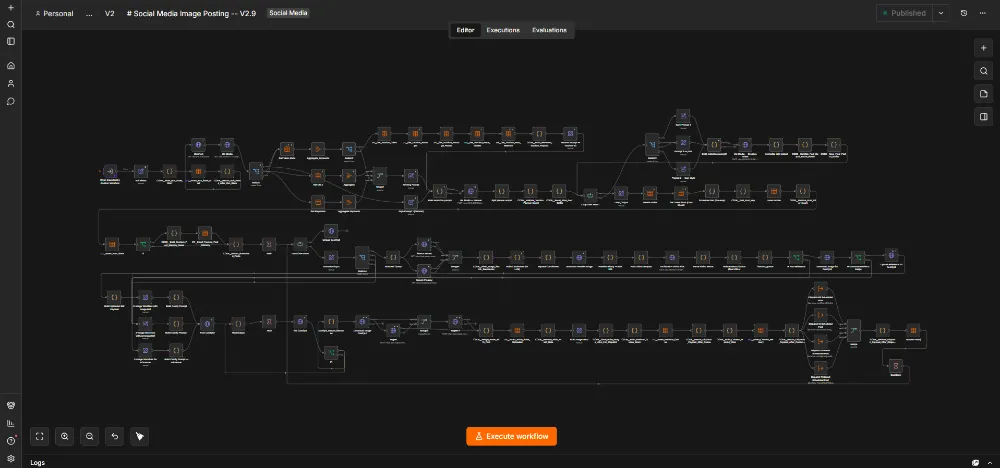
So I built an n8n-orchestrated multi-brand social media production system that turns brand strategy into planned content, AI-generated visuals, platform-specific captions and scheduled publishing.
One Engine, Multiple Brands
I did not want to maintain a completely separate automation for every business.
The parent workflow can call the same core Social Media Image Posting engine with different business configurations. Each brand can provide its own website, market, audience, region, keywords, campaign information, publishing accounts and scheduling rules.
The system has been designed around multiple real brand contexts, including printing businesses, travel/experience marketing and personal/influencer-style content.
This changed the architecture from:
“one workflow = one business”
into:
“one reusable production engine + controlled brand-specific inputs.”
Step 1 — Understand the Brand Before Creating Anything
The workflow begins with business context instead of asking AI to invent a generic social post.
Depending on the brand, the automation can receive:
- Brand and website identity
- Business description
- Target market
- Audience segments
- Geographic context
- Selected keyword universe
- Campaign or offer details
- Brand promise and positioning
- Publishing frequency
- Platform/account configuration
- Scheduling rules
This context becomes the boundary for the AI planner. The model is not asked to guess what the business sells or who the audience is.
Step 2 — Plan a Campaign, Not a Random Post
The next layer acts as a creative director and content planner, not simply a caption writer.
The planner creates a structured blueprint for each post before the final content is generated.
Planning fields evolved to include elements such as:
- Primary keyword/topic
- Post theme
- Scene concept
- Visual subject
- Camera angle
- Lighting direction
- Palette
- On-image text decision
- Caption angle
- Value points
- Call to action
- Platform content-length guidance
- Hashtag strategy
- Image-generation prompt direction
The workflow also validates sequential post indexes and campaign length so an automated run cannot silently produce missing or duplicate items.
The Repetition Problem
One of the first weaknesses of AI social content is repetition.
If I ask an AI model to create 20 posts for the same business, it tends to keep returning the same safe ideas: the same angle, same camera framing, same “Did you know?” hook, same visual composition and slightly different wording.
I therefore engineered deliberate variation into the planning layer.
The automation can rotate:
- Content themes
- Scene types
- Camera perspectives
- Lighting conditions
- Human presence
- Visual composition
- Caption angles
- CTA styles
- Hashtag groups
The goal is not random variation. The scene still has to make sense for the keyword, business and audience.
Step 3 — Different Platforms Get Different Writing
A major design decision was refusing to use one caption everywhere.
Facebook, Instagram, LinkedIn and Pinterest behave differently, so the workflow contains different writing contracts for each platform.
Instagram is more visual and compact, with a hook, scene/value paragraph, concise bullets, soft CTA and hashtags.
Facebook can use a slightly more conversational or story-oriented structure with value points placed differently.
LinkedIn gets a more professional, insight-led format with a separate title, micro-story, practical lesson, structured bullets and a relevant closing question.
Pinterest is written for discovery and saving behavior, with its own title and descriptive content style.
Even emoji use, hashtag ranges and caption length can be controlled differently by platform.
Ethical Conversion Copy Instead of Automated Hype
I also built conversion principles into the copy rules.
The writing system can use:
- Emotional hooks
- Clear value
- Identity fit
- Trust/process cues
- Soft qualification
- Clear calls to action
- Ethical urgency only when the input actually supports urgency
The system should not manufacture fake scarcity simply because urgency can improve response. If a departure has limited seats, that can be used. If no limitation exists, the AI should not invent one.
Step 4 — Find a Useful Visual Reference
The system does not always generate images completely blind.
It can search image providers such as Pexels and Pixabay for a useful reference that matches the planned scene.
The workflow checks whether the returned asset is actually usable as an image before sending it into the generation pipeline.
If a valid reference is available, it can be uploaded into ComfyUI and used as a realism/composition anchor.
If the reference fails, is invalid or is unavailable, the workflow has a separate no-reference generation path instead of killing the entire campaign.
Step 5 — n8n Dynamically Builds the ComfyUI Generation Job
This is where the workflow becomes more than a normal SaaS automation.
n8n does not simply send a sentence to an image API. It can dynamically construct the actual ComfyUI workflow payload.
Depending on the content and configuration, the system can control:
- Image width and height
- Sampling steps
- CFG
- Denoise strength
- Seed behavior
- Upscaling
- Reference-image strength
- LoRA strength
- Signature or brand-image placement
- Prompt content
The workflow then submits the job to ComfyUI, waits for processing, checks the generation history, extracts the finished filename and downloads the generated asset.
Why I Used ComfyUI
I wanted more control than a one-click “generate image” product normally provides.
ComfyUI allowed the image system itself to become programmable.
The automation can decide whether a reference image is needed, choose generation settings, modify the graph inputs and keep image production inside a repeatable workflow.
This also fits my wider approach of using local/self-hosted AI where it makes sense, reducing dependence on one vendor and giving me more control over cost and production behavior.
Step 6 — Publishing-Ready Media
After generation, the output image has to become usable by external social platforms.
The workflow retrieves the finished asset and can move it through a web-accessible image-hosting step before social distribution.
This sounds like a small implementation detail, but it is one of the differences between a demo and a production automation: a generated image sitting on a local ComfyUI machine is useless to a remote publishing API until the workflow moves it into a form that the platform can access.
Step 7 — A Real Scheduling Ledger Instead of “Wait Six Hours”
Another problem appeared when multiple brands or campaigns could publish through the same automation system.
A basic Wait node is not enough because separate workflow runs can accidentally choose the same publishing slot.
I built a social scheduling ledger using n8n Data Tables.
The scheduling layer can track information such as:
- Slot key
- Base UTC publishing time
- Campaign key
- Status
- Reservation time
- Run ID
- Post index
- Keyword
Slots can move through states such as active and reserved, allowing a workflow run to check what is already taken before committing another post.
This transformed scheduling from a delay into actual state management.
Step 8 — Dispatch to Four Social Platforms
Once the visual, copy and scheduling data are ready, the workflow branches into platform-specific publishing paths.
The production system was designed around:
Each platform receives the content format intended for that platform instead of receiving one generic payload.
What Happens When Something Breaks?
External services fail. Search providers return bad assets. AI responses are malformed. Local image servers go offline. Uploads fail. Social APIs reject requests.
The workflow therefore includes retry, fallback and error-routing behavior instead of assuming the happy path will always work.
Examples include:
Reference-image search fails:
Continue through the no-reference image-generation path.
Reference upload fails:
Do not pretend the reference exists; normalize the payload and continue through an appropriate path.
ComfyUI processing needs time:
Submit the generation job, wait, query history and retrieve the actual output rather than assuming generation was instant.
Another campaign already owns a schedule slot:
Read the scheduling ledger and reserve a different valid slot.
A child workflow fails:
The parent orchestration can use error outputs and spacing between workflow calls rather than allowing one brand failure to automatically destroy all other brand runs.
How the Architecture Evolved
The saved workflow history shows that the system kept becoming more structured rather than remaining a one-off experiment.
Later versions added richer content-planning contracts, stronger platform-specific writing rules, more detailed image prompting, better reference handling, reusable brand configuration and more explicit scheduling state.
One especially important evolution was moving from “generate a post” thinking toward campaign-level planning. The system plans several posts together so it can reason about diversity across the set rather than optimizing every post in isolation.
Multi-Brand Orchestration
A parent n8n workflow coordinates brand runs and calls the same Social Media Image Posting subworkflow with different configurations.
It can also deliberately space executions so several brands do not hit the image-generation or external-service infrastructure at exactly the same moment.
This means the system can scale by adding a controlled configuration rather than copying and rebuilding the entire automation for every new client.
The Most Important Lesson
Before building this system, it was easy to think about social automation as:
AI → caption → image → post.
Building the real workflow taught me that useful automation needs much more:
Brand Strategy → Campaign Planning → Diversity Control → Platform Writing → Visual Research → Image Generation → Media Handling → Scheduling State → Publishing → Error Recovery.
The AI is only one component.
The real value comes from the orchestration around it.
What This Project Demonstrates
This system combines several areas I had learned separately over the years: social media management, copywriting, graphic design, AI image generation, prompt engineering, APIs and automation.
Instead of replacing those skills with AI, I used those skills to define what the AI and automation should actually do.
The result is not a chatbot that creates posts. It is a reusable content-production pipeline designed to reduce repetitive work while preserving brand context, platform differences and operational control.
Skills Demonstrated
n8n · AI Automation · Multi-Brand Workflow Architecture · Social Media Automation · Content Strategy · Prompt Engineering · Structured AI Outputs · Local LLMs · ComfyUI · AI Image Generation · Reference Image Workflows · Facebook Automation · Instagram Automation · LinkedIn Automation · Pinterest Automation · Scheduling Systems · n8n Data Tables · APIs · HTTP Requests · JSON · Error Handling · Fallback Logic · Campaign Planning · Conversion Copywriting · Self-Hosted AI Infrastructure