AI Automation — How a Simple Meta Ads Automation Grew Into a Conditional Advertising Operating System
Role: AI Automation Builder, n8n Workflow Architect, Meta Ads Strategist & Advertising Systems Designer
Core Stack: n8n, Meta Marketing API, AI/LLM APIs, Meta Pixel, CAPI, Structured JSON, ComfyUI, Slack/Discord Review Flows, First-Party Lead Data
It Started With a Much Simpler Goal
I did not begin this project planning to build a large network of Meta Ads workflows.
The first idea was much simpler:
Take a business brief, let AI help plan the campaign, create the ads, launch them, and automate some of the daily optimization work.
That became the first generation:
WF-01 META Plan And Launch → WF-02 META Daily Optimizer → WF-03 META Intraday Watchdog.

V1 proved that the full advertising lifecycle could be automated.
Then reality started breaking the assumptions.
Every serious problem asked the same question:
“Should this responsibility really live inside the main workflow?”
Most of the time, the answer became:
No. This should only run when a specific condition exists.
That is how V2 grew.
The First Problem — “I Want Leads” Does Not Mean the Account Is Ready for Lead Optimization
In the beginning, the requested business goal looked like the obvious starting point.
A client says:
“I want leads.”
So build a lead campaign.
Except one real test exposed a dangerous assumption.
The website had a Meta Pixel.
The landing page existed.
The form existed.
But the actual Lead event was not verified.
If the system blindly created a website-leads campaign, Meta would be asked to optimize toward a conversion signal that was not yet trustworthy.
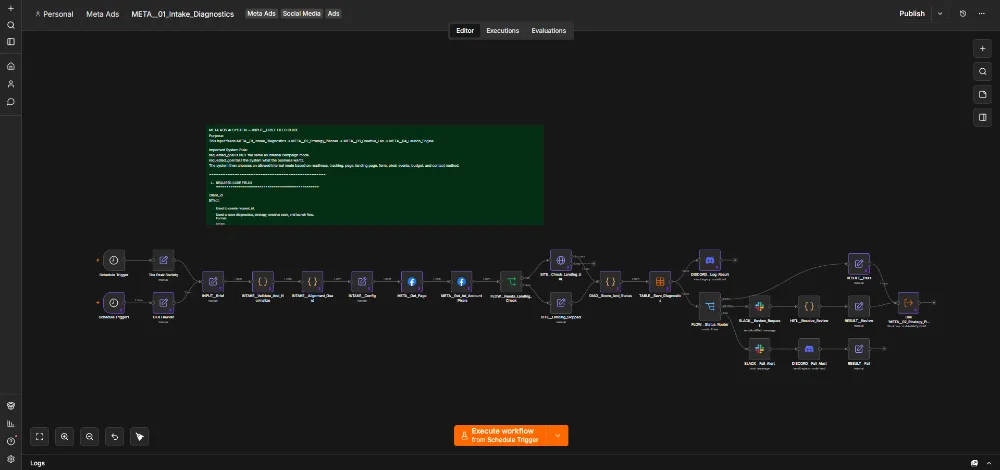
That is why META_01_Intake_Diagnostics became its own workflow.
Its job is not to make ads.
Its job is to challenge the request before the strategy begins.
Diagnostics Became the Gatekeeper
META_01 can check the conditions that determine what kind of campaign is actually possible:
- Website readiness
- Landing-page availability
- Form capture
- Pixel state
- Verified lead/purchase events
- WhatsApp availability
- Instant Forms
- Warm audiences
- Budget
- Targeting requirements
- Location
- Creative constraints
The biggest change in thinking was this:
The client’s requested goal and the technically valid Meta campaign mode are not always the same thing.
Diagnostics can therefore decide:
PASS → continue
REVIEW → human judgment required
FAIL → do not continue with this campaign mode
This was the first major safety boundary.
Then Strategy Had to Be Separated From Diagnostics
Once META_01 could establish what was actually possible, the next question became:
“Given the real constraints, what should we run?”
That became META_02_Strategy_Planner.
I did not want diagnostics trying to be a media buyer, and I did not want the Launch Engine inventing strategy while creating API objects.
The strategy layer could focus on:
- Campaign objective
- Allowed campaign mode
- Audience
- Location
- Interests
- Advantage+ behavior
- Budget tier
- Creative format
- Testing method
- KPI
- Lead-quality goal
- Creative direction
- Daily operating rules
Then Small Budgets Exposed Another AI Problem
AI loves sophisticated-looking plans.
Give it a small budget and it can still recommend:
three campaigns, multiple ad sets, several audiences and a complicated A/B-testing structure.
One saved test used around PKR 700/day.
At that budget, fragmentation would make the system look sophisticated while destroying the ability to learn anything useful.
So the Strategy Planner gained another rule:
Small budgets require simpler architecture, not weaker thinking.
The strategy can collapse toward one campaign, one focused ad set and one clear creative test rather than pretending a tiny budget can support an enterprise test matrix.
Then Exact Targeting Data Started Fighting With AI
Another issue appeared around geography.
The business input could already contain exact target areas with latitude and longitude.
An AI model might convert that into:
“Lahore”
because it looks cleaner in natural language.
But the exact coordinates were better than the AI’s simplification.
That became a permanent architecture rule:
When deterministic data already knows the exact answer, do not let AI rewrite it.
AI can reason about audience strategy.
Code owns exact coordinates, IDs, budgets, dates, booleans and API field shapes.
Then Advantage+ Created a Targeting Conflict
Meta’s audience expansion features can be useful.
But what if the business has a strict age or gender requirement?
Now the system has two instructions that can conflict:
“Target this exact audience.”
and:
“Allow Meta to expand beyond it.”
So the strategy logic had to learn that Advantage+ should not be treated as universally correct.
Strict targeting requirements can become a reason to restrict or disable expansion.
Again, the system got better not by adding more AI freedom, but by defining where AI freedom should stop.
Then I Realized Strategy Should Not Directly Feed the Creative Model
If I gave the Creative AI the entire raw business brief and said:
“Make ads.”
it could invent details that sounded plausible:
- A city that was never specified
- A service the company does not sell
- A dashboard that does not exist
- A niche that was never approved
- Proof that was never supplied
So META_02 started producing a clean creative source-of-truth package.
That package could contain only the information the Creative Lab is allowed to use:
- Offer
- Audience
- Pain points
- Benefits
- Objections
- Allowed claims
- Available proof
- Visual subjects
- CTA options
- Words and claims to avoid
That became the input for META_03_Creative_Lab.
The Creative Lab Exposed the Next Risk — AI Is Too Good at Selling

Persuasive AI copy has a problem:
It wants to make the offer sound stronger.
Sometimes much stronger than the evidence allows.
If left unrestricted, the model can drift toward:
- Guaranteed leads
- Guaranteed revenue
- Guaranteed ROAS
- Guaranteed ranking
- Instant-results claims
- Fake scarcity
- “100% automated” claims
- “Replace 10 employees” language
- Unverified partner/status claims
- “Make millions” promises
That forced another system rule:
AI can optimize persuasion. It cannot manufacture proof.
The Creative Lab therefore became constrained by allowed claims, proof and explicit forbidden language.
Then Carousel Ads Became a System Inside the System
At first, a carousel sounded like:
“Generate ten cards.”
That created another problem.
Ten independent AI cards do not automatically create one strong advertisement.
So I started treating the carousel like a miniature landing page.
A ten-card sequence could deliberately move through:
- Stop-scroll pain
- Cost of the old way
- The missing system
- Introduce the offer
- Main benefit
- Secondary benefit
- Trust / quality control
- Objection handling
- Who it is for
- CTA
Each card gets one persuasion job.
The system became much better when I stopped thinking about “creative quantity” and started thinking about creative sequence.
Then I Needed Image Rendering — But Not Inside Creative Lab
Once the Creative Lab could decide what the image should communicate, another question appeared:
Should the same workflow also run ComfyUI, manage image generation, wait for results and handle rendering failures?
No.
That would make META_03 responsible for both creative reasoning and image infrastructure.
So META_06_ComfyUI_Image_Renderer became a separate service.
The Creative Lab decides:
what should be created.
The renderer handles:
how the approved creative is produced.
And importantly, it only needs to run when the campaign actually requires generated visual assets.
Then “Creative Generated Successfully” Turned Out Not to Mean “Creative Is Ready”
A model can return valid creative JSON and still produce something I do not want to spend money on.
The Creative Lab therefore gained validation around:
- Expected concept count
- Image/render availability
- Offer/proof cards
- Warnings
- Missing inputs
- Whether human review is still required
The system had to distinguish:
AI generated something
from:
this creative package is approved for paid media.
That Is Why Human Review Became Its Own Lane
At first, review logic existed inside larger workflows.
But as the system grew, human approval became a reusable operation.
So META_06A_Slack_Review_Bridge became its own workflow.
If a strategy, creative package or operational action needs human judgment, the system can route that decision outward rather than forcing someone to open the n8n editor.
This is an important principle in the architecture:
Human approval is not a failure of automation.
When real client money is involved, approval is part of the safety system.
Then Launch Became the Largest Engineering Problem
Once strategy and creative were properly separated, I could finally make META_04_Launch_Engine focus on execution.
This workflow became much larger than the original V1 Plan-and-Launch system because Meta’s object relationships are not simple.
The launch system has to coordinate stages such as:
- Approved diagnostics
- Approved strategy
- Approved creative state
- Launch eligibility
- Campaign creation
- Ad-set creation
- Budget and targeting payloads
- Image/media upload
- Single-image paths
- Carousel paths
- Creative object creation
- Ad creation
- QA
- Launch-state logging
- Approval / activation control
- Failure notification
At this stage, the AI is no longer the main actor.
Deterministic code has to preserve exact campaign IDs, ad-set IDs, asset references, budgets, targeting shapes and API contracts.
The Biggest Safety Rule — AI Should Not Directly Spend Money
The system architecture eventually settled on this separation:
AI recommends.
Validation checks.
Human approval can authorize.
Launch Engine executes.
This is much safer than giving an autonomous agent direct authority over a payment-enabled ad account.
At This Point I Thought the Hard Part Was Finished
Then the campaigns began generating leads.
And that exposed the next problem.
Meta might say:
“This ad generated 20 leads.”
But the business might say:
“Eighteen of them are junk.”
If the automation only sees Meta’s dashboard, it can optimize toward the wrong thing very efficiently.
That is why META_05A_Lead_Signal_Event_Capture became its own workflow.
Lead Quality Changed the Meaning of Optimization
The Lead Signal layer can carry first-party information such as:
- Campaign ID
- Ad-set ID
- Ad ID
- Facebook click identifiers
- Browser identifiers
- Lead status
- Lead score
- Lead quality
- Conversion value
- CAPI eligibility
This lets the system begin connecting:
Ad → click → lead → qualified/unqualified lead → business value.
That is much more useful than optimizing toward raw lead count.
Then Daily Optimization Became Too Dangerous to Leave Broad
V1 had a general Daily Optimizer.
But after building the rest of the system, I became less comfortable with the idea that a scheduled workflow should automatically change campaigns just because some metric moved.
So V2 separated observation into META_05_Daily_Ops.
Daily Ops can collect and evaluate campaign state.
But observation is not the same as permission to mutate.
This is the same lesson that appeared across my other AI systems:
diagnose first, act second.
Then the System Needed the Ability to Do Nothing
This became one of the most important design decisions.
An “AI optimizer” feels pressure to optimize.
If it runs every day, it wants to produce an action every day.
But real advertising often needs patience.
Maybe the campaign has not collected enough data.
Maybe the metric moved because of normal variance.
Maybe the campaign simply needs another day.
That is why META_05B_AI_Manager_Action_Controller became its own workflow.
And one of its most important concepts is:
WAIT / SILENT is a valid result.
The automation does not have to change something merely because it woke up.
Sometimes doing nothing is the most professional action available.
Then Real Conversions Needed to Go Back to Meta
Once Lead Signal knew which leads were actually useful, another opportunity appeared.
Instead of leaving that truth inside my own system, eligible conversion outcomes could be sent back toward Meta.
That is why META_07_CAPI_Offline_Conversion_Import exists.
It is a conditional lane.
If the business has eligible first-party conversion data, the system can use it.
If it does not, there is no reason to run the workflow.
This helps move the optimization loop closer to:
real business outcome
instead of:
cheap form submission.
Then the Same First-Party Data Became Useful for Audiences
Once good customer/lead data existed, the next question was obvious:
Can this improve our audience strategy too?
That became META_08_Custom_Audience_Sync.
Again, it does not need to run every time.
It exists for the condition:
eligible first-party audience data is available and should be synchronized.
This kept audience operations outside the Launch Engine and outside Daily Ops.
Then Every Workflow Started Needing Error Alerts
As the system grew, every module had the same operational requirement:
Tell me when something fails.
Copying Slack/Discord/error logic into every workflow would create another maintenance problem.
So META_99_Error_Notify became shared infrastructure.
This is the same design principle that shaped the rest of V2:
If several workflows need the same capability, centralize it.
What Happened to the Original V1 Watchdog?
V1 used a broad Intraday Watchdog.
By V2, the responsibilities that originally belonged to large “optimizer/watchdog” workflows became more specialized:
Daily Ops observes.
Lead Signal brings in real business quality.
Action Controller decides whether anything should happen.
Slack Review can ask for human judgment.
CAPI can feed verified outcomes back.
Error Notify handles failures.
The system did not simply get larger.


The old broad responsibilities were broken apart because they required different permissions, different evidence and different failure behavior.
V1 vs V2
V1:
Plan & Launch → Daily Optimizer → Intraday Watchdog
V2:
Diagnose → Strategize → Build Creative → Render Visuals When Needed → Human Review When Needed → Launch Safely → Observe Daily → Capture Real Lead Quality → Decide Whether to Act or Wait → Feed Qualified Outcomes Back → Sync Eligible Audiences → Centralize Errors
The Important Part Is “When Needed”
The V2 system does not become better because it has more workflows.
It becomes better because not every capability runs for every campaign.
Tracking not ready? Stop in Diagnostics.
Strategy needs human review? Route to review.
No custom image required? Do not call the renderer.
Creative requires approval? Use Slack Review Bridge.
Lead quality data exists? Feed Lead Signal.
Not enough evidence to optimize? WAIT / SILENT.
Eligible conversion outcome exists? Send it through CAPI.
Eligible first-party audience exists? Sync Custom Audience.
Nothing needs changing? Leave the campaign alone.
The Biggest Lesson
At the beginning, I thought the difficult part would be automating the Meta Marketing API.
That was not the real challenge.
The hard part was deciding:
what the AI is allowed to decide, when a workflow is allowed to run, what evidence is required before an action, and where a human should still have authority.
I started with a system that tried to plan, launch and optimize ads.
I ended with a system where:
some workflows diagnose,
some recommend,
some render,
some execute,
some observe,
some bring back real business truth,
some ask a human,
and some exist only to say:
“Not enough evidence. Do nothing.”
What This Project Demonstrates
This project combines my experience in Meta Ads, paid-media strategy, conversion tracking, lead quality, AI systems, API integration, n8n and operational risk control.
But the most important thing it demonstrates is architecture.
I did not keep adding workflows because a complicated canvas looks impressive.
I added them whenever a real risk or conditional requirement showed that one part of the system needed a different responsibility, permission boundary or failure mode.
That is how a Meta campaign automation gradually became an advertising operating system.
Skills Demonstrated
n8n · Meta Ads · Meta Marketing API · AI Automation · Campaign Strategy · Conversion Tracking · Meta Pixel · CAPI · Lead Scoring · Lead Quality Feedback · AI Creative Systems · Prompt Engineering · ComfyUI · Human-in-the-Loop Review · Slack Automation · Custom Audiences · Campaign QA · API Integration · Conditional Workflows · Error Handling · Paid Media Operations · Production AI Systems