AI Automation — How One Google Ads Workflow Grew Into a Conditional PPC Operating System
Role: AI Automation Builder, n8n Workflow Architect, Google Ads Strategist & PPC Systems Designer
Core Stack: n8n, Google Ads API, AI/LLM APIs, Structured JSON, Offline Conversion Data, Customer Match, Slack/Operational Alerts
It Started With a Much Simpler Idea
I did not begin this project planning to build fifteen Google Ads workflows.
The original idea was much smaller:
Give the system a business brief, let AI help plan the campaign, build the Google Ads structure, and reduce the amount of repetitive work required to launch it.
That sounded reasonable.
Then I started building it.
And almost every serious PPC problem asked the same question:
“What happens when this one assumption is not true?”
That is how the system grew.
Not because I wanted more workflows.
Because I kept finding situations where the safe answer was:
“This should not run every time. This needs its own conditional module.”
The First Problem — A Campaign Brief Is Not Automatically Launchable
At first, it was tempting to let the AI strategy planner accept whatever the user requested.
Someone says:
“I want leads.”
Easy. Build a lead campaign.
Except it is not that simple.
What if the landing page is not ready?
What if the conversion action exists but is not verified?
What if the business wants calls but call tracking is missing?
What if the budget is too small for the structure being requested?
What if the client asks for a campaign type the current setup cannot measure properly?
That is why GOOGLE__01_Intake_Diagnostics became its own workflow.
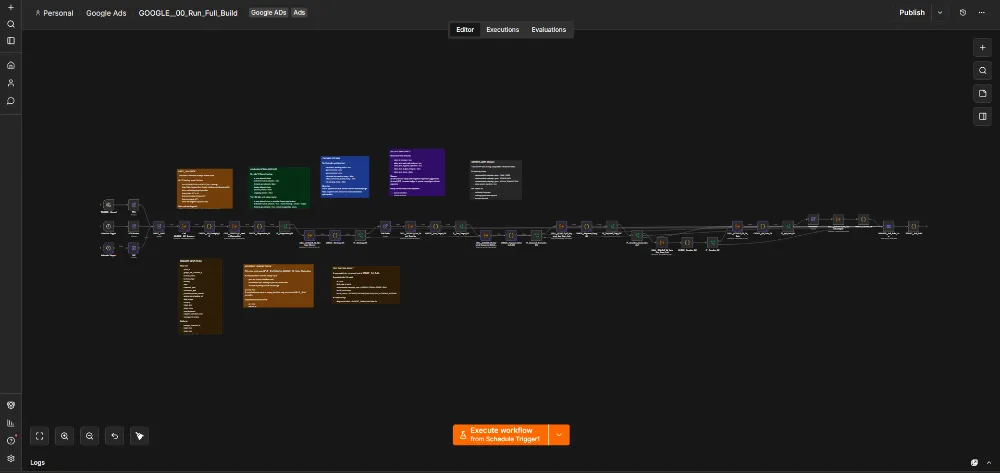
Its job is not to create ads.
Its job is to challenge the request before money is involved.
The first lesson of the system became:
Do not automate the requested campaign. First verify that the requested campaign makes sense.
Then Strategy Became Its Own Responsibility
Once diagnostics could establish what was actually possible, the next question appeared:
“Given these constraints, what should we run?”
That became GOOGLE__02_Strategy_Planner.
I separated strategy because I did not want the Launch Engine deciding marketing strategy while it was also building API payloads.
The strategy layer could think about:
- Campaign objective
- Search intent
- Budget
- Target market
- Offer
- Landing-page fit
- Keyword direction
- Testing structure
- Conversion goal
But it still did not get permission to decide exact technical values that code already knows better.
AI can reason.
Code should own exact IDs, budgets, entity relationships and API contracts.
Then Geography Broke the “Just Let AI Handle It” Idea
Location targeting looked simple until I dealt with the difference between:
“Lahore” as a human-readable place
and
the exact Google Ads geo target entity required by the platform.
That was not something I wanted an AI model casually inventing.
So instead of stuffing geo resolution into Strategy Planner, I created GOOGLE__Geo_Target_Resolver.
And importantly, it does not need to run for every possible case.
If the correct Google geo entity is already known, there is no reason to ask another AI or API to “figure it out” again.
This became one of the architectural patterns I kept repeating:
If a capability is only needed under a specific condition, make it an optional workflow rather than permanent complexity inside the main path.
Keywords Created the Next Problem
Google Search campaigns live or die by search intent.
At first, AI-generated keyword ideas looked useful.
Then another problem became obvious:
An AI can generate hundreds of phrases that sound relevant while still being commercially useless.
Some are too broad.
Some belong to another service.
Some are informational when the campaign needs buying intent.
Some look relevant linguistically but are terrible paid-search targets.
So GOOGLE__03_Keyword_And_Copy_Lab became its own controlled stage.
The job was not:
“Give me lots of keywords.”
It became:
“Build a keyword and ad-copy structure that actually matches the offer, intent and campaign strategy.”
Then I Needed Keyword Research — But Not Every Time
Later, I wanted stronger external keyword enrichment.
But I did not want every campaign run to automatically launch a large keyword-research process.
Sometimes the approved keyword set is already enough.
Sometimes it needs expansion or deeper research.
That is why GOOGLE__09_Keyword_Research_Enrichment exists as a separate workflow.
It can be called when the system actually needs additional keyword intelligence.
This is much safer than letting Daily Ops see one interesting search term and immediately generate fifty new keywords around it.
Then Creative Assets Became Optional Too
Not every Google Ads campaign needs the same kind of creative production.
A standard Search campaign may mostly depend on text assets.
Other formats and extensions may require richer creative assets.
I did not want the keyword/copy workflow to become an image-production system too.
So GOOGLE__04_Creative_Asset_Lab became another specialized lane.
Again, the rule was simple:
Only invoke expensive or specialized creative production when the campaign actually requires it.
Then I Realized “Valid Output” Is Not the Same as “Safe to Launch”
This was one of the biggest changes.
An AI response can be perfectly valid JSON and still be a bad campaign.
A keyword list can be structurally correct and still contain poor intent.
An ad can fit character limits and still make a dangerous claim.
A campaign can have all required fields and still have broken tracking.
So I added GOOGLE__04_QA_Gate.
This workflow exists because I stopped trusting:
“The previous workflow completed successfully.”
as proof that the campaign should move forward.
The QA Gate asks a more useful question:
“Should this package be allowed to reach the Launch Engine?”
Then Launch Became Its Own Engineering Problem
Once the strategy, keywords, copy, creative and QA were separated, the launch workflow could finally do one job properly.
GOOGLE__05_Launch_Engine translates approved campaign intent into actual Google Ads entities.
This is where exactness matters:
- Campaign relationships
- Ad groups
- Keywords
- Ads
- Budgets
- Bidding settings
- Geo targets
- Conversion configuration
- Platform IDs
I deliberately did not make this the marketing brain.
By the time Launch Engine runs, the creative thinking should already be finished.
Its job is execution.
Then I Found Another Risk — Building and Activating Are Two Different Decisions
One of the safest architectural changes was separating:
“Campaign successfully created”
from
“Campaign allowed to begin spending.”
That is why GOOGLE__05A_Activate_Existing_Test_Run exists.
I wanted the system to be able to build a technically complete campaign, inspect it, and only then activate it through a separate controlled step.
This gives the operator a final boundary before money starts moving.
It also makes testing safer because campaign creation can be validated independently from activation.
At This Point I Thought the System Was Almost Finished
Then I launched campaigns.
And immediately learned that launch is not the end of Google Ads.
It is the beginning.
The next questions were:
Is the campaign delivering?
Are the search terms good?
Is CTR actually poor, or do we only have 40 impressions?
Is CPA high because the bid is wrong, or because the landing page is weak?
Are there no conversions because the campaign is bad, or because tracking is broken?
That is why GOOGLE__06_Daily_Ops had to exist.
Daily Ops Became Read-Only on Purpose
This was another major maturity point.
The first instinct with an “AI optimizer” is:
Find a problem → change the campaign.
I stopped liking that idea.
So Daily Ops became much more diagnostic.
It can examine things such as:
- Spend
- Clicks
- Impressions
- CTR
- CPC
- Conversions
- CPA
- CVR
- ROAS
- Search terms
- Conversion actions
- Policy issues
- Ad-rank loss
- Budget limitations
But more importantly, it tries to determine why a metric looks bad.
Low CTR and low CVR are not the same problem.
Broken tracking and zero real conversions are not the same problem.
Budget-limited and economically profitable are not the same thing.
Then the System Taught Me Not to Optimize Too Early
Another problem appeared quickly:
AI is very eager to explain tiny datasets.
If a campaign has eight impressions, it can still confidently tell you why CTR is bad.
That is nonsense.
So the system gained minimum-evidence thresholds.
Do not judge CTR before enough impressions.
Do not judge CVR before enough clicks.
Do not make CPA conclusions before meaningful spend.
Do not recommend aggressive changes to a campaign that has barely had time to collect data.
This changed the optimizer from:
“Always have an opinion.”
to:
“Only form an opinion when the evidence deserves one.”
Then a Real Bid Problem Changed the Architecture Again
One of the most useful tests involved a mismatch between the internal campaign configuration and the live Google Ads account.
The configured CPC cap was around 150.
The live account was showing a cap around 300.
The campaign was also showing bid limitation signals.
Spend had occurred.
Conversions were still zero.
The easy automated response would have been:
“Google says the campaign is bid-limited. Raise the bid.”
The system did not do that.
Instead, the safer conclusion was:
Something has drifted between approved configuration and live state.
Before touching bids:
- Reconcile the live campaign against the approved internal configuration
- Verify conversion tracking
- Inspect real lead quality
- Review landing-page relevance
- Do not automatically raise the bid cap
That failure taught me one of the strongest lessons in the whole project:
Google’s warning is an input, not an instruction.
Then Keyword Drift Appeared
Another real problem was discovering that the live keyword set could differ from the approved keyword-policy table.
Which version is correct?
The live account?
The internal configuration?
The last AI recommendation?
The answer is:
Do not guess.
Reconcile the states.
This made me think about the system in three layers:
Approved state → configured state → live state.
Automation becomes dangerous when it assumes those are always identical.
This Is Why GOOGLE__06B_Action_Controller Exists
Daily Ops became good at saying:
“Something looks wrong.”
But I did not want that same workflow to also say:
“Therefore I am changing the account now.”
So I separated diagnosis from mutation.
GOOGLE__06B_Action_Controller exists because an observed problem does not automatically grant permission to act.
The system can decide:
- Evidence is insufficient → wait
- Operator review is needed → escalate
- Tracking must be repaired first → block optimization
- A safe bounded action is allowed → prepare it
- The campaign should not be patched anymore → send it toward rebuild
This is much safer than putting an AI agent directly inside a payment-enabled account and telling it to “optimize every day.”
Then I Needed a Workflow for When Optimization Is the Wrong Answer
This became GOOGLE__07_Rebuild_Experiment_Engine.
Sometimes the campaign does not need another bid adjustment.
Sometimes the structure itself is wrong.
The keywords may be poorly grouped.
The search intent may be wrong.
The offer may not match the landing page.
The ads may be solving the wrong problem.
Continuously tweaking a structurally bad campaign only creates a better-optimized bad campaign.
So instead of forcing Daily Ops into an endless repair loop, I created a separate lane:
Stop patching → propose a controlled rebuild/experiment.
Then the Biggest Attribution Problem Appeared
Google Ads can tell me:
“This keyword generated a conversion.”
But the business can tell me:
“That conversion was spam.”
Those are very different realities.
This is why GOOGLE__08_Offline_Conversion_Import exists.
The system needed a way to bring downstream business outcomes back toward the advertising platform.
The real optimization chain should become:
Keyword → search query → click → lead → qualified lead → customer/value.
Without that feedback, Google can become very efficient at finding cheap people who never become good customers.
Then First-Party Data Became Useful Beyond Attribution
Once the system had qualified lead/customer data, another opportunity appeared.
That became GOOGLE__09_Customer_Match_Audience_Sync.
Again, this does not need to run for every person or every campaign.
It should only run when eligible first-party data exists and the audience operation is appropriate.
So it became another conditional service rather than another permanent branch inside Launch Engine.
Then I Got Tired of Debugging Credentials Inside Business Logic
When an API call fails, I do not want to wonder:
Is the strategy wrong?
Is the payload wrong?
Or is authentication broken?
That is why GOOGLE__API_Connection_Test exists.
Connection/authentication testing became its own small diagnostic workflow so infrastructure problems can be isolated from campaign logic.
And Eventually Errors Needed Their Own System Too
As the architecture grew, every workflow needed alerts.
Duplicating the same Slack/Discord/error logic across every automation would create another maintenance problem.
So GOOGLE__99_Error_Notify became the shared failure-notification layer.
That is the final pattern behind the architecture:
If several workflows need the same operational capability, make it reusable instead of copying it everywhere.
What the System Became
I started trying to automate Google Ads campaign creation.
I ended up building something closer to a conditional PPC operating system:
Diagnose → Strategize → Resolve Geo When Needed → Build Keywords & Copy → Enrich Research When Needed → Build Creative Assets When Needed → QA → Build Campaign → Activate Separately → Observe Daily → Decide Whether Action Is Allowed → Rebuild Instead of Over-Tweaking → Import Real Conversion Quality → Sync Eligible Audiences → Centralize Failures.


The Important Part Is the “When Needed”
The system did not become better because it had more workflows.
It became better because the workflows stopped pretending every campaign needs the same process.
Need geo resolution? Run the geo resolver.
Need deeper keyword research? Run enrichment.
Need creative assets? Call the Creative Asset Lab.
Need activation? Use the activation boundary.
Need a safe change? Send it through Action Controller.
Campaign structure is fundamentally wrong? Stop tweaking and use Rebuild Experiment.
Have real downstream conversion data? Feed it back through Offline Conversion Import.
Have eligible first-party audience data? Sync it through Customer Match.
Nothing meaningful needs changing today? Do nothing.
The Biggest Lesson
At the beginning, I thought a strong automation was one workflow that did everything.
Building this system taught me the opposite.
A strong production system is often a network of small responsibilities with clear boundaries.
Some run every time.
Some run only when a condition is true.
Some are allowed to recommend.
Some are allowed to mutate.
Some exist only to stop the rest of the system from making a bad decision.
And sometimes the most professional automated action is:
“There is not enough evidence. Leave the campaign alone.”
What This Project Demonstrates
This project combines my experience in Google Ads, search intent, conversion tracking, automation, AI systems, API design and operational risk control.
But the most important capability it demonstrates is systems thinking.
I did not keep adding workflows because complexity looked impressive.
I added them when a real failure, risk or optional requirement showed that one responsibility needed its own boundary.
That is how a campaign builder gradually became a PPC operating system.
Skills Demonstrated
n8n · Google Ads · Google Ads API · AI Automation · PPC Strategy · Keyword Research · Search Intent · Conversion Tracking · Offline Conversions · Customer Match · Geo Targeting · Campaign QA · Bidding Logic · Search-Term Analysis · AI Strategy · Structured Outputs · API Integration · Conditional Workflows · Human-in-the-Loop Control · Error Handling · Production Automation · Systems Architecture